An AI workflow is not just a single step done with AI.
It is a series of steps for getting a job done, with AI doing or helping with one or more of those steps — while people can still guide, check, or finish the work.
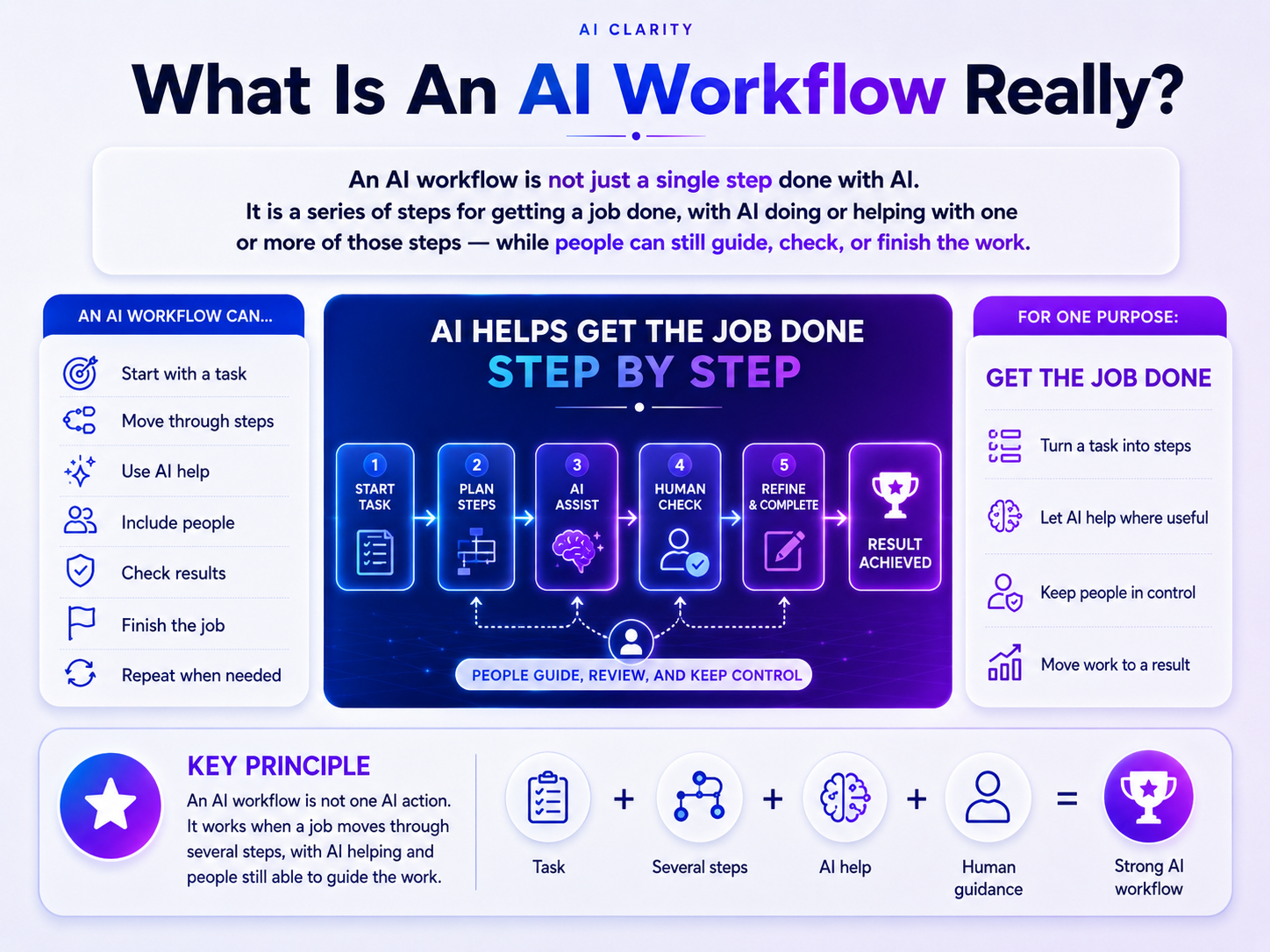
AI workflow definition — what an AI workflow actually is
The term “AI workflow” is now used for almost anything involving AI — from asking a chatbot one question to running an entire automated business process.
But these are not the same thing.
- AI may also do most of the work
- AI may complete only a small part of the job
- People can still set the goal, provide information, review the result, correct mistakes, or decide when the work is finished.
An AI workflow begins when a job moves through several connected steps and AI does or helps with at least one of them.
This guide explains what makes something an AI workflow, what does not count as one, how people and AI can share the work, and how to build a workflow that actually gets the job done.
Why “AI Workflow” Is So Confusing
Different people use the term for different things.
- Businesses often describe an AI workflow as a structured process that uses AI to automate tasks or make work more efficient
- Software developers may use “workflow” more narrowly for a defined path that coordinates AI models, tools, functions, and human approvals
- Some technical frameworks distinguish workflows from agents by saying that workflows follow paths designed in advance, while agents have more freedom to decide what to do next.
These meanings can all be useful in their own contexts.
The problem begins when they make a simple idea sound more technical than it needs to be.
At its core, an AI workflow is still about completing a job through several steps. AI simply has a real role in one or more of those steps.
You do not need an AI agent, a complex automation platform, or a team of developers before you can have an AI workflow.
What Makes Something an AI Workflow?
Four things must be present:
- There is a job to be done
- AI does or helps with at least one step
- The steps move the job toward a result
- The job moves through more than one step.
Let us look at each part.
-
There Is a Job to Be Done
Every useful workflow starts with something that needs to be completed.
The job might be:
- writing an article
- creating a report
- analyzing feedback
- processing an order
- reviewing a contract
- answering a customer
- preparing a presentation
- or solving a technical problem.
The job gives the workflow its purpose.
Without a clear job or result, people may be using AI, testing prompts, or exploring ideas — but they do not yet have a meaningful workflow.
A workflow should answer a simple question: What are we trying to finish?
-
The Job Moves Through More Than One Step
A workflow is more than one isolated action.
The work needs to move through several stages. The result of one stage may become the information, decision, or starting point for the next.
For example: Topic chosen → questions organized → draft created → facts checked → content improved → article published.
The steps do not always have to follow one straight line.
They may repeat, split into different paths, happen at the same time, or pause until someone approves the next action. Modern workflow systems commonly support branches, loops, parallel work, checkpoints, and human approval points.
What matters is not whether the path is perfectly linear.
What matters is that the steps are connected and help move the same job toward completion.
-
AI Does or Helps With at Least One Step
AI must have a real role in the work.
It might:
- analyze data
- translate text
- create a draft
- generate ideas
- compare options
- classify requests
- organize information
- identify possible errors
- summarize a document
- recommend a next action
or perform an action through another tool.
-
AI does not have to appear in every step
A person may do the first three steps, ask AI to help with the fourth, and then complete the rest manually.
That is still an AI workflow because AI meaningfully contributes to the job.
Simply opening an AI tool or adding an AI label to a process is not enough. AI must actually do or help with part of the work.
The Steps Lead Toward a Result
A workflow should move work somewhere.
The result might be:
- a report delivered
- a decision approved
- a piece of code tested
- an application reviewed
- an article ready to publish
- a customer request resolved
- or an order completed.
A long chain of AI actions is not automatically a useful workflow.
If the steps do not move the job toward a recognizable result, the process may only be producing more activity, more outputs, or more confusion.
The purpose of a workflow is not to keep AI busy. It is to get the job done.
A Simple AI Workflow Example
Imagine that someone wants to write an article with help from AI.
The workflow might look like this:
- The article is approved and published
- The person checks the facts and meaning
- AI helps improve unclear or repetitive sections
- AI helps organize those questions into an outline
- AI helps identify the main questions readers may have
- The person decides which questions should be included
- A person chooses the topic and the purpose of the article
- The person adds experience, evidence, and original ideas.
This is an AI workflow because:
- there is a clear job
- AI helps with some of those steps
- the job moves through several connected steps
- a person continues to guide and check the work
- and the steps lead to a finished article.
The AI is part of the workflow, but it is not the entire workflow.
The same structure could apply to customer support: Request received → AI classifies the problem → person reviews unusual cases → AI drafts a response → person approves it → response sent
The specific tools and steps may change, but the underlying idea remains the same.
What Is Not an AI Workflow?
Understanding what does not count as an AI workflow makes the concept much clearer.
-
One Question or One AI Action
Suppose you ask an AI chatbot: “What is the capital of France?”
The AI replies: “Paris.”
That is normally an AI interaction or AI task.
It is not a complete AI workflow because the job does not move through several connected steps.
The length of the prompt does not change this.
A prompt may contain ten instructions and still produce one response in one action. It becomes part of a workflow when that output is checked, transformed, passed to another stage, used to make a decision, or otherwise moves through a larger process.
-
Several Unconnected AI Tools
Using many AI tools does not automatically create a workflow.
You might:
- generate an image with one tool
- and ask a chatbot a separate question
- summarize an unrelated document with another.
These are three AI activities, but they are not necessarily one workflow.
They become a workflow when the work is connected: Brief created → image generated → image reviewed → changes requested → final image approved and published
A collection of tools is not the same as a flow of work.
-
A Normal Workflow With AI Added for Appearance
A company may describe a process as “AI-powered” because one small AI feature appears somewhere inside it.
That does not always mean AI has a meaningful role.
For example, automatically correcting one spelling mistake in a large manual process may technically involve AI, but it may not be useful to define the entire operation by that tiny feature.
The term “AI workflow” should help people understand how the work gets done.
It should not be used only because AI sounds modern.
-
An Endless Chain of Outputs
AI can generate one output after another without bringing the job closer to completion.
More drafts, more suggestions, more agents, and more steps do not necessarily create a better workflow.
A useful workflow has direction.
Each important step should either:
- catch a problem
- improve the result
- reduce uncertainty
- move the work forward
- or help someone make a necessary decision.
Does an AI Workflow Have to Be Automated?
No.
An AI workflow can be:
- partly automated
- or fully automated
- guided manually by people.
AI involvement and automation are not the same thing.
-
AI-Assisted Workflow
In an AI-assisted workflow, people actively move the job through the steps.
For example:
- AI summarizes it
- AI rewrites one section
- A person uploads a document
- The person reviews the summary
- The person approves the final version.
The process does not run by itself, but it is still an AI workflow.
-
Partly Automated AI Workflow
Some steps may happen automatically while people remain involved at important points.
For example:
- AI drafts a possible response
- A person reviews and sends it
- AI automatically identifies the topic
- A customer submits a support request
- The request is sent to the correct team.
Here, automation moves the work between stages, but a person still controls the final response.
-
Fully Automated AI Workflow
A workflow may also run from beginning to end with little or no human action during normal cases.
For example:
- Information is extracted
- AI reads and classifies it
- The data is checked against rules
- A system detects a new document
- The result is stored or sent to another system.
A person may still design the process, monitor performance, handle exceptions, or review high-risk cases.
Current AI workflow platforms support both automated execution and human-in-the-loop approval, showing that human involvement and automation can exist in the same workflow.
The simplest distinction is: A workflow describes how the work moves through its steps. Automation describes which of those steps run by themselves.
Where Do People Fit in an AI Workflow?
People do not disappear simply because AI joins the work.
Their role may change.
Instead of manually completing every action, people may:
- correct errors
- define the goal
- provide context
- choose the process
- check facts and quality
- decide what AI should do
- handle unusual situations
- approve important actions
- or accept responsibility for the final result.
A human may appear at the beginning, middle, end, or throughout the workflow.
For low-risk and repetitive work, AI may be allowed to do more.
For work involving money, safety, health, law, reputation, or important personal decisions, stronger human review may be necessary.
There is no universal percentage of human work and AI work that makes a process an AI workflow.
- AI might help with one step
- It might perform nearly every step.
The concept remains the same as long as the job moves through connected steps and AI has a real role in completing it.
AI Workflow vs AI Task, Automation, Agent, and System
These terms are connected, but they do not mean the same thing.
-
AI Task vs AI Workflow
An AI task is one piece of work done with AI.
Examples include:
- classifying one email
- or generating one image
- translating one paragraph
- summarizing one document.
An AI workflow connects several steps to complete a larger job.
A task can be one step inside a workflow.
Task: AI summarizes a report.
Workflow: Report received → AI summarizes it → person checks key findings → AI creates slides → presentation approved.
-
AI Workflow vs AI Automation
An AI workflow describes the steps through which the job is completed.
AI automation describes the use of technology to make one or more of those steps run automatically.
A workflow can exist without automation.
Automation can also be added to only part of a workflow.
Workflow: the structure of the work
Automation: how parts of the work run without manual action
-
AI Workflow vs AI Agent
An AI workflow is the path or structure through which work gets done.
An AI agent is an AI-based system that can pursue a goal, make some decisions, use tools, and take actions with a level of independence.
An agent may work inside a workflow.
It may choose how to complete one stage, select tools, create smaller tasks, or adjust its next action based on what happened before.
A workflow does not need an agent.
In technical discussions, Anthropic distinguishes predefined workflows from agents that dynamically direct their own processes and tool use. Google similarly describes agents as systems with autonomy to reason, plan, decide, and act toward a goal.
For a general reader, the easiest distinction is: The workflow describes how the work moves. The agent describes an AI actor that can decide and act within that work.
-
AI Workflow vs AI System
An AI system is the larger collection of components that makes AI-powered work possible.
It may include:
- data
- tools
- rules
- models
- memory
- interfaces
- databases
- security controls
- and infrastructure.
An AI workflow is one way that work moves through some of those components.
One AI system may support many workflows.
One workflow may also use several different systems.
-
AI Workflow vs AI Orchestration
AI orchestration is the coordination of models, agents, tools, systems, and tasks so that they work together correctly.
- A workflow describes the work that needs to move
- Orchestration manages how the different technical parts cooperate to move it.
Simple AI workflows may not need a dedicated orchestration platform. More complex automated or multi-agent workflows often do. IBM describes AI orchestration as coordinating and managing AI models, systems, and integrations inside a larger workflow or application.
How to Tell Whether You Have an AI Workflow
Ask four questions:
- Is there a clear job or result?
- Do the steps move the job toward completion?
- Does AI genuinely do or help with at least one step?
- Does the work move through more than one connected step?
When the answer to all four is yes, you probably have an AI workflow.
When the answer to question two is no, you probably have a single AI task.
When the answer to question three is no, you may have a normal workflow without meaningful AI involvement.
When the answer to question four is no, you may have a collection of actions that produces activity without reliably completing the job.
This test works whether the workflow is:
- simple or technical
- manual or automated
- based on one AI model or many
- used by one person or a large company
- fixed in advance or partly controlled by an agent.
How to Build a Simple AI Workflow
A good AI workflow does not begin with the question: “Where can we add AI?”
It begins with: “What job needs to be done?”
-
Step 1: Define the Finished Result
Describe what “done” looks like.
Avoid goals such as:
- use AI more
- automate content
- improve productivity
- or become more innovative.
These are broad ambitions, not finished results.
A clearer result would be:
- turn a topic into a publishable article
- turn research notes into a fact-checked report
- turn a customer request into an approved reply
- or turn invoice files into verified accounting records.
When the result is clear, it becomes easier to judge whether the workflow works.
-
Step 2: Break the Job Into Real Steps
List the stages that already exist or should exist.
Do not add steps only to make the workflow look sophisticated.
For each step, ask:
- What information is needed?
- What needs to happen here?
- What should this step produce?
- What must happen before the next step begins?
The workflow should reflect the real work, not an attractive diagram.
-
Step 3: Decide Where AI Is Actually Useful
Look for steps where AI can make a meaningful contribution.
AI may be useful when the work involves:
- drafting
- translation
- comparison
- summarization
- pattern recognition
- repeated classification
- large amounts of text or data
- or generating possible options.
AI may be less suitable when the step requires:
- physical action
- sensitive judgment
- personal responsibility
- information AI cannot access
- or a decision whose cost of error is too high.
The goal is not to give AI the maximum number of steps.
The goal is to give AI the right steps.
-
Step 4: Define the Handoffs
A workflow breaks when one step produces something the next step cannot use.
For every stage, define:
- what comes out
- what goes into the step
- what happens during the step
- and where the output goes next.
For example: Customer email → AI identifies the problem → support category and suggested response → person reviews → final reply.
Clear handoffs prevent the workflow from becoming a collection of disconnected actions.
-
Step 5: Keep Human Checks Where They Matter
Decide where a person needs to:
- verify a fact
- correct meaning
- approve an action
- handle an exception
- or accept responsibility.
Not every AI output needs manual approval.
But removing human review simply because automation is possible can create larger problems later.
Human checks should be based on the risk and importance of the decision, not on fear of AI or excitement about it.
-
Step 6: Test the Result
Do not judge the workflow only by how quickly it runs.
Check whether it consistently produces a useful result.
Ask:
- Is the result accurate?
- Did AI create new errors?
- Was the job actually completed?
- Did the workflow save meaningful time?
- What happens when an unusual case appears?
- Did it remove work or only move work elsewhere?
- Can someone understand and correct what happened?
A fast workflow that produces unreliable results is not a good workflow.
-
Step 7: Remove Unnecessary Steps
More steps do not mean a stronger workflow.
A step should remain only when it helps:
- reduce risk
- improve the output
- move the work forward
- make a required decision
- or provide necessary information.
Remove duplicated checks, unused AI outputs, unnecessary approvals, and tools that add complexity without improving the result.
The best workflow is often simpler than its first version.
What Makes an AI Workflow Good?
A good AI workflow has a clear purpose.
Its steps are connected.
- Errors can be detected before they become final results
- AI receives enough information to perform its role properly
- People remain involved where context, judgment, or responsibility matters
- The workflow can also handle failure instead of assuming that every AI output will be correct.
Most importantly, the workflow produces something useful.
The value of an AI workflow is not measured by how much work AI does, but by how well the job gets done.
A workflow is not automatically better because:
- it uses an agent
- it has more steps
- it uses more AI tools
- it removes more people
- or it runs without stopping.
Sometimes the best workflow uses AI once and gives people full control over the rest.
Sometimes the best workflow is highly automated.
The right balance depends on the job, the risk, and the result that needs to be achieved.
Common Misunderstandings About AI Workflows
-
“Every AI Prompt Is a Workflow”
A prompt is usually an instruction given during one AI interaction.
It can be part of a workflow, but it is not automatically a workflow by itself.
The work must move through several connected steps.
-
“An AI Workflow Must Be Automated”
Automation is optional.
A person can manually guide the job through every step while using AI for one or more parts.
That is still an AI workflow.
-
“An AI Workflow Needs an AI Agent”
An agent may perform or coordinate steps inside a workflow, but it is not required.
Many useful AI workflows use simple AI tools, fixed instructions, and human decisions.
-
“AI Must Do Most of the Work”
AI only needs a meaningful role in one or more steps.
The amount of work AI performs does not define the workflow.
-
“More AI Makes the Workflow Better”
More AI can also create:
- more cost
- more delay
- more errors
- more difficult reviews
- and less understanding of what went wrong.
AI should be used where it improves the job, not where it merely makes the workflow appear more advanced.
-
“More Steps Make the Workflow More Complete”
Unnecessary steps make a workflow slower and harder to manage.
The purpose is to complete the job, not to create the longest possible process.
Final Definition
An AI workflow is not just a single step done with AI.
It is a sequence of steps for getting a task/job done, with AI doing or helping with one or more of those steps — while humans can still guide, check, or finish the work.
The details may change from one workflow to another.
Some workflows are guided by people. Others are mostly automated. Some use one AI tool, while others use several models, systems, or agents.
But the core remains the same:
- There is a job
- The steps lead toward a result
- That is what makes it an AI workflow
- AI does or helps with part of the work
- The job moves through several connected steps.
* Learn more about:
- What is AI content really?
- What is SEO content really?
- SEO Content vs AI Content: What Actually Gets Chosen?
Frequently Asked Questions About AI Workflows (FAQs)
Below are some frequently asked questions about AI workflows that Cao Cao believes need priority clarification.
-
Is Using ChatGPT Once an AI Workflow?
Usually, no.
Asking ChatGPT one question and receiving one answer is normally an AI interaction or AI task.
It becomes part of an AI workflow when the result moves into additional connected steps — such as review, revision, approval, publication, or use in another task.
ChatGPT is a tool that can participate in a workflow. It is not automatically the entire workflow.
-
Can One Prompt Start an AI Workflow?
Yes.
One prompt can trigger an AI workflow even though the prompt itself is not the full workflow.
For example, a user may submit one request, while a system behind the interface:
- calls tools
- creates a draft
- checks the result
- analyzes the request
- searches for information
- and sends the final response.
From the user’s view, it began with one prompt. Behind the scenes, the job moved through several connected steps.
-
Does an AI Workflow Have to Be Automated?
No.
An AI workflow can be guided manually, partly automated, or fully automated.
Automation only determines which steps run by themselves. It does not determine whether the process qualifies as an AI workflow.
-
What Is the Difference Between an AI Workflow and AI Automation?
An AI workflow describes the series of steps through which a job is completed.
AI automation makes one or more of those steps run automatically.
You can have:
- a partly automated AI workflow
- an AI workflow with no automation
- or a fully automated AI workflow.
The workflow is the structure of the work. Automation is one way of running it.
-
What Is the Difference Between an AI Workflow and an AI Agent?
An AI workflow describes how work moves from one step to another.
An AI agent is a system that can make decisions and take actions toward a goal with some independence.
An agent can operate inside a workflow, coordinate several steps, or sometimes decide which steps should happen next.
A workflow does not need an agent, and an agent is not the same thing as the whole workflow.
-
What Is an Agentic Workflow?
An agentic workflow is an AI workflow in which one or more AI agents have meaningful freedom to decide, act, use tools, or coordinate tasks.
Instead of following only fixed instructions, an agent may adjust its next action based on the goal, available information, and results of earlier actions.
Agentic workflows generally offer more flexibility, but they can also be harder to predict, test, and control. Current descriptions from Google and IBM emphasize autonomy, planning, tool use, and action as key characteristics of agentic systems and workflows.
-
Do You Need Coding or Special Software to Create an AI Workflow?
No.
A simple AI workflow can use:
- a document
- an AI chatbot
- a spreadsheet
- and a person moving the work between steps.
Coding and workflow platforms become useful when the process needs to run automatically, connect many systems, handle large volumes of work, or manage complex rules.
They can make a workflow easier to scale, but they do not create the underlying concept.